

Suppose you have a business idea of developing an AI-powered application in your mind. Maybe you want to build a product – something that users use every day or a service – that solves a real-world problem. There is one obvious question – Do you need to build the AI model yourself? The answer is usually no. Creating an AI model from scratch is a massive investment. Fortunately, today, the smartest AI models are already available via API . You can use these existing models on top of your product. Developers can connect their applications to existing AI models with just a few lines of code. This changes the question we should be asking. The question is no longer:
“Can I build a powerful AI model?”
It is:
“What can I build using a powerful AI model that already exists?”
And the bridge between your application and those AI models is the API.
In this article, we will see what an API is, why an API is needed. We will also see how it works and how will you use api to access powerful AI models (in Python). We will understand API requests and responses, JSON, and endpoints and how to extract the actual AI-generated response from a structured response object. More importantly, we will also see what api key is and how it keeps track of your usage.
Why API matter in AI Applications ?
APIs are the gateway to powerful models. Today, you can access world-class AI models using APIs in just a few lines of code. Suppose you’ve just built a product. Now you want to add intelligence to it. What would you do now? Will you start building a model from scratch? The correct answer is no. You don’t need to build this artificial intelligence from scratch anymore. Instead, use an AI model that already provides that intelligence. Why should you not build AI from scratch in this case? Creating an AI model from scratch would require big research teams, expensive GPUs, huge datasets and many months of training with a massive amount of investment in training costs.
Companies such as OpenAI, Google, Anthropic, and others have already invested heavily in building powerful models. As an application developer, you can use those models via APIs instead of building them yourself. Today, every modern app consumes APIs. APIs is being used for real world services like payments, authentication, notifications, maps, translations, etc.
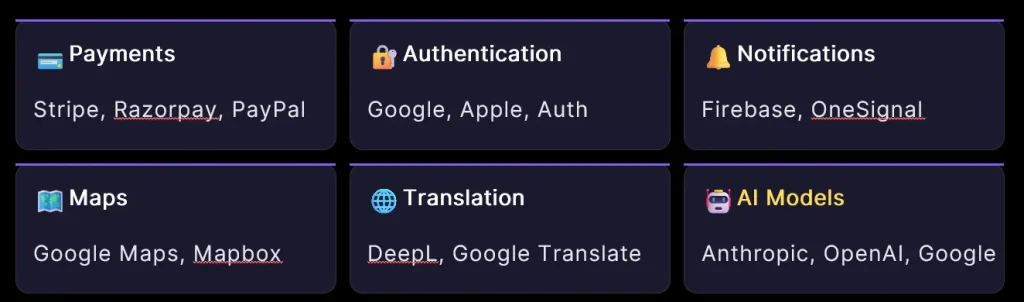
Above image shows that not every API is an AI model. Payments, authentication, and maps are APIs – but they do not need AI for their usual task. However, these are just the API that can be used by developers in their code so that they do not need to write everything from scratch.
For AI, we have APIs of powerful models provided by Google, OpenAI, Anthropic, and Hugging Face. APIs have become the bridge between AI models and real-world applications.
What is an API?
API stands for Application Programming Interface. An API is a set of rules that allows one software application to communicate with another.
Suppose you are building an application where you will allow only authorised users to use your application. You have two approaches to choose from : First approach is to take the data from the users , verify their phone number and email ID, store their information and password securely in the database, and manage the database and authorise users using the information stored in it. Second approach is where you can ask Google whether the user is a genuine user. Google has already verified billions of users. Your application may call Google’s authentication API and asks: “Is this user genuine?” If Google verifies the user, your application allows them to log in. And we know, too many applications today are already using this to authenticate users.
Now lets take another use case: suppose you’re building a Swiggy-like app? This app must provide the map to delivery boys to help them to route from their current location to the restaurant. Instead of building your own maps, navigation system, and traffic analysis from scratch, you can use Google Maps APIs for routing and traffic details, which is already providing accurate details. When your application is integrated with goggle map api, users will see the delivery time, and rider will see the route.
Swiggy is also doing the same. They have not built a traffic analysis system and maps from scratch, but use Google Maps APIs.
Thus, AI is becoming just another service developers plug directly into their applications by using API.
How does an API work?
At a high level, the process looks like this:
Client → API → Server → API → Client
Client sends a request. Example: “Give me today’s weather.” API receives and routes the request to the appropriate server. The server processes the request and sends back data – for example, weather data in JSON format. API receives the JSON response and forwards it back to the client.
Client and server can be written in completely different languages. A Python app can call a JavaScript service. This is one of the reasons why APIs are so powerful.
Restaurant Analogy
A unique feature of APIs is that it exposes only what’s needed- the internal code , the database, server logic stays hidden and protected.
API can be analogous to a restaurant kitchen.
The waiter = the API.
The kitchen = hidden internals.
When u go to the restaurant, you do not directly go into the kitchen and cook the food. Instead, you place an order with the waiter in place. You just need to know:
1. what the available food items, ,
2. the price chart, and
3. what you want to eat.
The waiter goes into the kitchen and brings your food on the table. APIS work in a similar way. Developers only need to know three things –
- What input to send.
- What output they will get.
- How to use that response in their application.
How an API speaks – JSON
JSON stands for JavaScript Object Notation. An API usually does not simply send you a paragraph of text. It sends structured data. In modern APIs, JSON is the structured way to send and receive data. Both request and response are usually in JSON. Here is a very small sample of a JSON response .
– response.json –
{ “city”: “Mumbai”, “temp”: 28,
“sky”: “clear”, “humidity”: 62 }
It look like a Python dictionary. There are several fields here – City, temp, sky, humidity . If you want to know the value of city, you need to fetch the value of city field from here.
What happens behind the scenes
- User interacts with the application.
- User wants to know weather information.
- App builds a JSON request with the required information.
- Request is sent over HTTP to the API endpoint – a URL.
- API server routes the request to the model server lying on a GPU cluster.
- The model server processes the request.
- On processing the request, it sends back a JSON response.
- Application reads the JSON, extracts info, renders UI for the user.
All this happens in a few hundred milliseconds. We have seen that in the above process, AI isn’t running on your laptop. Instead, you are borrowing the most powerful computers in the world for a fraction of your currency per request.
But what is an endpoint?
Simply, an endpoint is just an URL. An API endpoint is essentially a specific URL through which your application communicates with a service. Think of an endpoint as a specific destination for your request. So you are sending a JSON request to a particular URL. Suppose you want to access Anthropic’s model, you will use a URL like:
https://api.anthropic.com/v1/messages
Here, api.anthropic.com is the server address – the address of Anthropic’s API server.
/v1/messages is the API itself – The specific code that handles your request.
A single endpoint can serve different models. That means you can use same URL for different brains.
What the API server does?
It is a smart middleman. When your application send a requset, then API server may perform the following:
- Receives your request.
- Checks your API key – are you allowed?
- Checks rate limits – are you sending too many requests?
- Formats your request properly (adds system prompt if specified).
- Forwards it to the actual model server.
- Receives the response from model server – and returns it to you.
Using AI via API.
Now let’s connect your product to powerful AI models. To make a product AI-powered, you must decide two things:
FIRST : What task you want the AI to perform.
SECOND : Which company’s model you want to use.
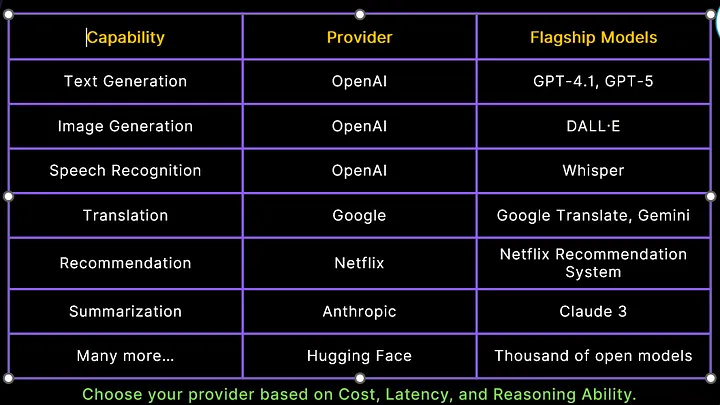
The table above lists the capabilities that you can achieve by using an AI model, and the providers that facilitate that capability. We choose an AI model based on the task, cost, speed, accuracy, and capabilities required for the application. Different models are trained differently and optimized for different purposes. To get higher intelligence, you pay higher cost but receive slower speed. If u pay less, you get a less capable model but faster response.
The six-step flow from your business idea to AI product.
Now here is the six-step flow to convert your business idea to an AI product.
- Choose the task.
- Choose the model.
- Get an API key.
- send an API request.
- Receive the AI response.
- Build your product on top of it.
What is an API Key
Once you pick a model, you need an API key. Think of an API key like a password or identity card. It’s an identity tag attached to every single request you make .It tells the server who you are, which application is making the request, and whether you are allowed.
API keys should be kept secret because anyone who has the key can use your account to access API , and you will be charged for their usage. It is the api key that usually keeps track of your usage. So , you must protect your API key. If your key leaks, someone may send requests with your key.
The server sees your key. You get charged. You get the bill as the server has no way to know it wasn’t you. The server identifies you via the API key.
What API key tracks?
API key keeps track of every request: who sent it, when, which model was used, how many tokens consumed, how much to charge.
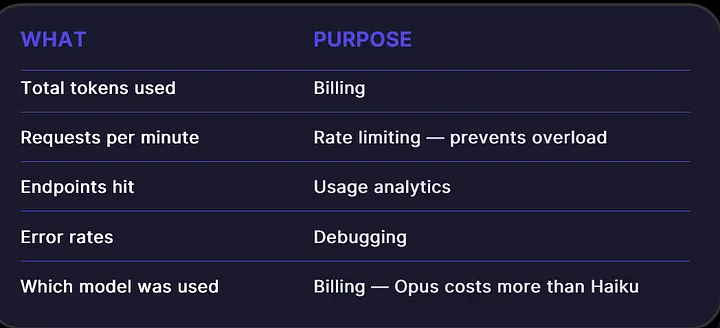
Getting an API key : A short walkthrough
The exact process depends on the provider. Suppose you want to access Anthropic’s model, you can follow the below steps to get an API key:
- Visit console.anthropic.com and create a free account.
- Navigate to “API Keys” in your dashboard.
- Create a new API key with a friendly name.
- Copy and store it immediately – you will never see it again.
- Never paste it directly into your code. Treat it like a bank password – store it in an environment variable.
You may also be asked to add your credit/debit card details for billing verification because you are going to get access to powerful GPUs and advanced models that are not free to use.
Your First AI API call with python
Now here is the first api call that we will be waiting for so long. You need these line to use api and build something valuable in python.
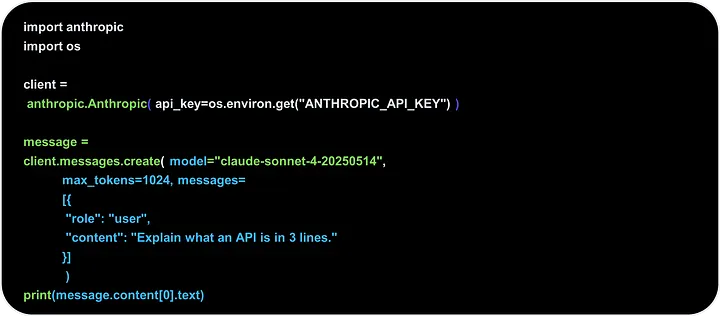
Suppose you want to use Anthropic’s model; you must install the Anthropic library by typing pip install anthropic. This SDK provides several modules helpful in making api calls to the Anthropic server. Anthopic.anthropic is an important module that sends client requests to the Anthropic API and receives responses from the api on behalf of your Python application. The created client object sends requests to the Anthropic API, receives responses from the API, handles authentication using your API key, and manages the underlying HTTP communication. This client object gets your api key from the OS environment. Before you can use your api key here, it must have been exported into your environment.
Another important line is client. message.create(). This function will take your input as well as the model name that you want to use, and here the model name is Claude Sonnet. We have messages parameter here that takes a list of dictionaries. Here we have only one dictionary having two fields: role and content. You are providing the input as a user, so the role is set as user. And the content is “explain what an api is in 3 lines.” This message variable will hold the response. To get the actual response , you have to type message.content[0].text.
max_tokens parameter specifies the maximum number of tokens the AI is allowed to generate in its response. It helps control response length, reduce API cost, and prevent extremely long outputs. max_tokens limits only the output size, not the input prompt size. Billing is often based on Total tokens = input tokens + output tokens
You have the models parameter also. If you are not satisfied with the current model’s response, or the response’s speed, you have the option to swap the model name to some other lighter-weight or heavier-weight models. Instead of Claude Sonnet, u can use Haiku – Fastest and least expensive, but less capable than Sonnet. Or you can also use Opus– the most capable model but most expensive and slowest among these three.
This means you will use the same SDK, the same endpoint, but just a different model.
Handling responses
You don’t get plain text back as a response. You get a structured JSON object – and the actual answer is buried inside it. Understanding JSON structure is the first real skill of working with any API. Here are the four working rules for working with API responses.
RULE 1 : Read the docs first. Every API structures its response differently.
RULE 2: Log the full response. See the actual structure before fetching text.
RULE 3: Never hardcode assumptions. Even the same company changes structure across models.
RULE 4: Filter by type when needed. Some responses have mixed content blocks. We use below line
print(message.content[0].text)
to extract text from the response. It indicates that the response may contain multiple content items or different types of content.
Inspecting a Message object
Start by printing the response:
print(response)You can also check its type:
print(type(response))And, depending on the Python object, inspect its attributes:
print(vars(response)) # every field inside
Here is the sample response object
Message( id=’msg_012kgzZAkgkZWkHwFnqTJjoy’, content=[ TextBlock(
text=”Here’s AI explained simply for an 8-year-old: …”, type=’text’ ) ],
model=’claude-sonnet-4-20250514′, role=’assistant’, stop_reason=’end_turn’, type=’message’,
usage=Usage(input_tokens=22, output_tokens=214, service_tier=’standard’) )
and the response is not in JSON format. Why isn’t the response raw JSON?
Why is the response not raw JSON?
The Python library or Python SDK converts JSON into a Python object for you. The server sends raw JSON. Python library Intercepts JSON and converts it to a Message object. Thus, u get a clean Python object. No manual JSON parsing in your code. Developers use the response like any Python object. Python libraries often hide JSON complexity by converting responses into Python objects.
Understanding the token usage- what you pay for
You pay by the token. With every request → somewhere in the world – a rack of GPUs wakes up and runs millions of mathematical operations to generate your response, token by token. So even a simple “sorry” or “thank you” technically consumes tokens, computation resources, electricity, and as a result a tiny amount of your money. So the next time you say “thank you” to ChatGPT, remember you just spent a few extra tokens and a tiny fraction of a GPU’s effort. And you can keep track of your token usage in the provider’s usage dashboard or also by looking at the usage object , which is included in the response object.
usage=Usage(input_tokens=22, output_tokens=214, service_tier=’standard’)
INPUT TOKENS are cheaper. It is what you send to the model. Reading a word is easier than generating one.
OUTPUT TOKENS are More expensive. It is what the model generates. Generating is harder than reading.
Always remember the rule:
RULE : Output always costs more than input.
Wrapping up, once you understand the workflow of the API the possibilities of applications become much broader . You can build applications for Text generation, Summarization,Translation, Question answering, Document analysis,Image understanding,Image generation,Speech recognition,Speech synthesis,Recommendation, Customer support and much more. So, get a business idea, and make it live by using API.