

Cybersecurity is not limited to learning about hackers, passwords, antivirus software or security tools. To understand how digital systems communicate and how network-based threats can be detected, students need to understand what actually happens when devices exchange data over a network.
One of the most useful ways to develop this understanding is through network packet analysis using Wireshark. By examining real network traffic, learners can study communication protocols, inspect packet headers, understand IP addressing, identify DHCP messages and interpret the hexadecimal representation of transmitted data.
In a practical cybersecurity class at TuxAcademy, Greater Noida West, students can explore these concepts through hands-on demonstrations involving the DHCP DORA process, packet inspection and binary-to-hexadecimal conversion. These exercises connect fundamental computer science concepts with the techniques used in network administration, security monitoring and troubleshooting.
This guide explains how Wireshark works, how the DHCP DORA process assigns IP addresses, how packet bytes are represented in hexadecimal, how binary values can be converted into hexadecimal and how these skills relate to real-world cybersecurity operations.
1. What Is Cybersecurity and Why Does Network Analysis Matter?
Cybersecurity is the practice of protecting computers, networks, applications and digital information from unauthorized access, misuse, disruption and other security threats.
Every organization that uses digital systems depends on communication between devices. Employees access websites, applications connect to databases, servers exchange information and cloud platforms communicate with remote services. Each interaction depends on underlying network protocols.
When communication fails or suspicious activity occurs, security professionals need to understand what the network is doing rather than relying only on error messages or application logs.
For example, consider a laptop that connects to a Wi-Fi network but cannot access the internet. The problem might involve DHCP configuration, an incorrect IP address, a gateway issue, DNS resolution or a firewall rule.
Similarly, an organization investigating unusual network activity may need to determine which devices are communicating, which protocols are involved and whether the observed traffic matches expected behavior.
Network packet analysis helps professionals investigate these questions using captured traffic.
Why is packet analysis important?
Packet analysis helps learners and professionals:
Understand how devices communicate across a network.
Examine source and destination addresses.
Identify protocols such as DHCP, DNS, TCP, UDP and HTTP.
Investigate network connectivity problems.
Recognize unexpected communication patterns.
Understand packet headers and payload data.
Develop foundational skills for Security Operations Center (SOC) analysis.
Support authorized network troubleshooting and security investigations.
Learning packet analysis provides a practical foundation for progressing toward network security, defensive security, incident response and other cybersecurity specializations.
2. What Is Wireshark?
Wireshark is a network protocol analyzer that allows users to capture and inspect network traffic from an available network interface or examine previously recorded packet captures.
Instead of showing only that a connection succeeded or failed, Wireshark helps users inspect the protocols and fields involved in network communication.
According to the official Wireshark User’s Guide, captured packets can be viewed in a packet list, a detailed protocol tree and a packet-bytes pane.
Understanding the Wireshark interface
A typical Wireshark window contains three important sections.
1. Packet List Pane
The packet list displays captured packets in rows. Common columns include:
No.: Packet or frame number.
Time: Timestamp associated with the packet.
Source: Source address.
Destination: Destination address.
Protocol: Protocol identified by Wireshark.
Length: Captured frame length.
Info: A short summary of the packet.
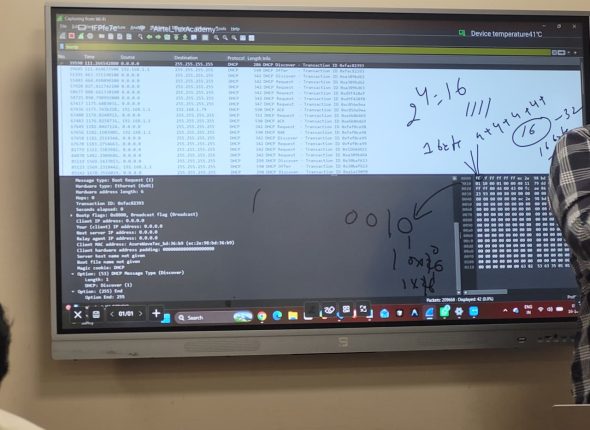
In the supplied classroom image, the packet list contains DHCP traffic. Several rows show DHCP Discover, DHCP Offer, DHCP Request and DHCP ACK messages.
These entries help learners identify the stages of the DHCP address-assignment process.
2. Packet Details Pane
When a packet is selected, this pane displays its protocol structure in an expandable tree.
For example, a DHCP packet carried over IPv4 and UDP may contain information associated with Ethernet, IP, UDP, BOOTP/DHCP and DHCP options.
Expanding these sections helps students understand how different protocol layers work together.
3. Packet Bytes Pane
This pane shows the captured packet data in hexadecimal, alongside an ASCII interpretation where applicable.
The image supplied with this lesson shows hexadecimal bytes in the packet-bytes section. The handwritten notes illustrate the relationship between binary values and hexadecimal representation.
Understanding these three panes is essential for interpreting network traffic effectively.
3. What Is a Network Packet?
A network packet is a formatted unit of data used by network protocols to communicate information. The exact terminology and structure depend on the protocol and network layer.
For example, Ethernet transmits frames on a local network, while IPv4 carries packets between networked hosts. UDP and TCP provide transport-layer communication.
A captured Ethernet frame may contain:
An Ethernet header.
An IP header, if the payload is an IP packet.
A transport-layer header, such as UDP or TCP.
Application or protocol data.
Additional fields or trailers, depending on the protocols involved.
A DHCP message commonly travels inside UDP, which is carried inside IP and then encapsulated in an Ethernet frame on an Ethernet network.
The packet’s structure allows receiving devices to determine where data came from, how it should be processed and which protocol should interpret the contents.
Header versus payload
The header contains control information required for delivery and interpretation. The payload contains the data carried by that protocol.
For instance, an IP header includes source and destination IP addresses. A UDP header includes source and destination ports. The DHCP message contains fields used to request and assign network configuration.
This distinction is important during security analysis. A packet’s headers can reveal unexpected destinations or unusual communication patterns, while its protocol payload may contain additional information needed to understand the event.
However, packet captures do not automatically reveal all application content. Encryption, capture limitations and the network interface being monitored can affect what an analyst can see.
4. What Is DHCP?
DHCP stands for Dynamic Host Configuration Protocol.
It allows a client device to obtain network configuration automatically rather than requiring an administrator to configure every network parameter manually.
When a laptop or another device joins a network, it may need an IP address, subnet mask, default gateway and DNS server information before it can communicate normally.
A DHCP server can provide these settings according to the network’s configuration.
Without suitable IP configuration, a device may be unable to communicate correctly with other systems or reach external networks.
What information can DHCP provide?
Depending on the network configuration, DHCP may provide:
An assigned IPv4 address.
A subnet mask.
A default gateway.
DNS server addresses.
An IP address lease duration.
Other configuration options supported by the network.
DHCP is widely used in home networks, offices, educational institutions, enterprise environments and many other IP networks.
From a cybersecurity perspective, understanding DHCP is important because address assignment is one of the basic processes that allow devices to participate in a network.
5. Understanding the DHCP DORA Process
DORA is a commonly used name for the four main messages involved in the initial DHCP IPv4 address-assignment exchange:
D – Discover
O – Offer
R – Request
A – Acknowledgment (ACK)
These messages help a DHCP client locate a server, receive an address offer, request an address and obtain confirmation.
The four steps are especially useful for beginners learning how to interpret DHCP traffic in Wireshark.
Step 1: DHCP Discover
When a client needs an IPv4 address, it may broadcast a DHCP Discover message to locate available DHCP servers.
At this stage, the client does not yet have the IPv4 configuration needed for ordinary communication on that network.
In a typical initial exchange, the client uses 0.0.0.0 as the IPv4 source address and 255.255.255.255 as the IPv4 destination address.
The Discover message effectively asks:
“Is there a DHCP server available to provide network configuration?”
In Wireshark, students can select the packet and inspect the DHCP message type and relevant client information.
The supplied image shows DHCP Discover entries, including traffic originating from 0.0.0.0 and directed to the IPv4 broadcast address 255.255.255.255.
This is a useful example of why the source address and destination address must be interpreted in context. An initial DHCP Discover packet can legitimately originate from 0.0.0.0.
Step 2: DHCP Offer
A DHCP server that can respond to the request may send a DHCP Offer.
The offer identifies a proposed IPv4 address and may include additional configuration information, such as the subnet mask, default gateway, DNS servers and lease duration.
The client can then evaluate the offer and proceed with the address-selection process.
In Wireshark, students should examine:
The DHCP message type.
The offered client address.
The DHCP server identifier.
Relevant configuration options.
The source and destination addresses.
The exact addressing and delivery behavior can vary with the client state, server configuration and network conditions.
Step 3: DHCP Request
The client sends a DHCP Request to indicate which offered address and server it intends to use.
In a typical initial allocation, this message may be broadcast so that the relevant DHCP servers can identify the client’s selection.
The request helps the selected server proceed with the allocation while other servers can withdraw their competing offers.
When examining the Request in Wireshark, learners should look for the requested IP address option, the server identifier where applicable, the client hardware address and the DHCP message type.
These fields help distinguish the Request from the earlier Discover and Offer messages.
Step 4: DHCP ACK
The DHCP server sends a DHCP Acknowledgment, commonly called DHCP ACK, to confirm the configuration.
Once the client has successfully completed the exchange and applied the configuration, it can use the assigned address according to the network settings and lease.
The ACK may include the allocated address and configuration parameters such as the lease duration, subnet mask, router and DNS servers.
In Wireshark, learners can select the ACK packet and compare it with the earlier messages.
A successful exchange should be interpreted as a sequence rather than as four unrelated packet entries.
DORA process summary
| Stage | Message | Purpose |
|---|---|---|
| D | DHCP Discover | Client searches for DHCP servers |
| O | DHCP Offer | Server offers an address and configuration |
| R | DHCP Request | Client indicates its requested allocation |
| A | DHCP ACK | Server confirms the allocation |
Important: DORA describes the typical initial DHCPv4 allocation sequence. DHCP can also involve renewal, rebinding, negative acknowledgments and other message flows. Not every DHCP capture contains a complete DORA sequence.
6. How to Capture DHCP Packets in Wireshark
The following exercise can help students understand the DORA process in a controlled lab.
Step 1: Open Wireshark
Install Wireshark from its official website and open it on a computer where you have permission to capture traffic.
Choose the relevant network interface, such as Wi-Fi or Ethernet.
The interface should be the one carrying the DHCP traffic you intend to examine.
Step 2: Start a capture
Start capturing packets on the selected interface.
To observe DHCP traffic, the computer needs to generate or encounter a relevant DHCP exchange. Merely starting a capture does not guarantee that a new DORA sequence will occur.
On a network you administer, you can use an appropriate, approved DHCP renewal or reconnection procedure to generate traffic.
Avoid renewing addresses or changing network configuration on systems where you do not have authorization.
Step 3: Apply a DHCP display filter
Enter the following display filter in Wireshark:
dhcp
This helps narrow the packet list to traffic decoded as DHCP.
In some Wireshark versions and contexts, DHCP may also be identified under BOOTP-related protocol terminology. If the filter does not produce the expected results, consult the installed version’s display-filter reference.
The official Wireshark DHCP display-filter reference lists supported DHCP fields.
Step 4: Identify the four messages
Look for:
DHCP Discover.
DHCP Offer.
DHCP Request.
DHCP ACK.
Select each packet individually and expand its protocol details.
Compare the message type, source and destination addresses, client information and configuration options.
Step 5: Compare the packet sequence
Check whether the packets appear to belong to the same client exchange. The message order, transaction ID, client information and packet references can help establish the relationship.
A capture might contain repeated Discover messages, multiple offers, retransmissions or unrelated DHCP exchanges. Therefore, packet order alone is not always enough to determine the full transaction.
Step 6: Inspect the packet bytes
Select a relevant packet and examine the packet-bytes pane.
Notice that Wireshark displays byte values using hexadecimal digits. Depending on the selected field, Wireshark can highlight the corresponding bytes in the packet representation.
This connection between the decoded protocol tree and the underlying byte sequence is an important learning objective.
7. What Is Binary Number Representation?
Binary is a number system that uses only two digits: 0 and 1.
Computers represent information using binary values at the logical level, while the underlying hardware stores and processes physical states that encode those values.
A binary digit is called a bit.
Eight bits form a group commonly called a byte.
For example:
00000000
This is an eight-bit binary value representing zero.
Another example is:
11111111
This represents 255 in unsigned eight-bit binary notation.
Binary is important for understanding digital data, IP addressing, bitwise operations, protocol flags and low-level computing.
However, long binary strings are difficult for people to read. This is one reason hexadecimal is widely used in debugging, networking and security analysis.
8. What Is Hexadecimal?
Hexadecimal is a base-16 number system. It uses sixteen symbols:
0 1 2 3 4 5 6 7 8 9 A B C D E F
The letters represent decimal values from 10 to 15.
| Hexadecimal | Decimal |
|---|---|
| A | 10 |
| B | 11 |
| C | 12 |
| D | 13 |
| E | 14 |
| F | 15 |
Each hexadecimal digit represents four binary bits.
For example:
Binary
0000= hexadecimal0.Binary
0001= hexadecimal1.Binary
1010= hexadecimalA.Binary
1111= hexadecimalF.
Because four bits correspond to one hexadecimal digit, eight-bit values can be represented using two hexadecimal digits.
This makes hexadecimal particularly useful for reading bytes in packet captures.
9. How to Convert Binary to Hexadecimal
The simplest manual method is to divide the binary value into groups of four bits, starting from the right-hand side.
Convert each four-bit group into its corresponding hexadecimal digit.
Example 1: Convert 00010000 to hexadecimal
Start with the binary value:
00010000
Divide it into two four-bit groups:
0001 0000
Convert each group:
0001=10000=0
Therefore:
00010000 (binary) = 10 (hexadecimal).
This is a hexadecimal value of 0x10, which equals decimal 16.
Example 2: Convert 11111111 to hexadecimal
Binary:
11111111
Divide it into groups:
1111 1111
Convert each group:
1111=F1111=F
Therefore:
11111111 (binary) = FF (hexadecimal).
The hexadecimal value FF equals decimal 255.
Example 3: Convert 10101100 to hexadecimal
Binary:
10101100
Divide it into groups:
1010 1100
Convert each group:
1010=A1100=C
Therefore:
10101100 (binary) = AC (hexadecimal).
The hexadecimal value AC equals decimal 172.
Example 4: Convert 00001010 to hexadecimal
Binary:
00001010
Divide it into groups:
0000 1010
Convert each group:
0000=01010=A
Therefore:
00001010 (binary) = 0A (hexadecimal).
The leading zero is retained when displaying the value as a full byte. Numerically, 0A in hexadecimal is decimal 10.
Binary-to-hexadecimal reference table
| Four-bit binary | Hexadecimal |
|---|---|
| 0000 | 0 |
| 0001 | 1 |
| 0010 | 2 |
| 0011 | 3 |
| 0100 | 4 |
| 0101 | 5 |
| 0110 | 6 |
| 0111 | 7 |
| 1000 | 8 |
| 1001 | 9 |
| 1010 | A |
| 1011 | B |
| 1100 | C |
| 1101 | D |
| 1110 | E |
| 1111 | F |
Memorizing this table makes binary-to-hexadecimal conversion faster during practical exercises.
10. Understanding Hexadecimal Bytes in Wireshark
When a packet is selected in Wireshark, the packet-bytes pane typically displays a hexadecimal dump.
The standard presentation includes an offset, hexadecimal byte values and an ASCII representation where printable characters can be shown.
For example:
0000 45 00 00 3c 1c 46 40 00
This is an illustrative byte sequence, not a transcription of the packet shown in the supplied photograph.
The first column represents the offset of the displayed data. The hexadecimal values show the bytes, and the ASCII column, where present, shows printable character interpretations.
What does a byte mean in hexadecimal?
Consider the byte:
FF
This represents the eight-bit value:
11111111
Now consider:
00
This represents:
00000000
Each pair of hexadecimal digits represents one byte when used in a conventional byte-oriented hexadecimal dump.
Two hexadecimal digits provide 256 possible byte values, ranging from 00 to FF.
Why does Wireshark use hexadecimal?
Hexadecimal is compact and makes it easier to inspect binary protocol fields without displaying every bit individually.
A protocol analyzer can interpret these bytes according to the relevant protocol specification and display meaningful fields such as message types, addresses, flags and lengths.
This allows an analyst to move between a high-level explanation and the underlying data.
For example, the decoded DHCP message type might be displayed as Discover, while the underlying packet contains the encoded field representing that message type.
The precise byte offset depends on the packet structure and the protocol fields preceding it.
Students should avoid assuming that a particular byte position has the same meaning in every packet. Ethernet headers, optional tags, IPv4 options, encapsulation and other factors can change offsets.
11. How Binary, Hexadecimal and Packet Analysis Work Together
Binary and hexadecimal are not separate topics from networking. They are two ways of representing numerical data used throughout computer systems.
Consider the following workflow:
A device sends a network packet.
The network interface captures the frame.
Wireshark displays the packet’s bytes in hexadecimal.
Wireshark decodes the protocol fields using the relevant protocol rules.
The analyst examines those fields to understand the communication.
If needed, the analyst studies the underlying bytes to verify the decoded interpretation.
This workflow demonstrates how fundamental number systems support practical cybersecurity investigation.
A practical learning example
Suppose a student selects a DHCP Discover packet.
The packet details show the DHCP message type as Discover. The packet list shows the source and destination addresses, while the packet-bytes pane presents the underlying bytes.
The student can then study how the protocol structure is represented, why the client has not yet obtained its IPv4 address and how the next message in the exchange differs from the first.
The objective is not simply to memorize hexadecimal values. It is to connect the bytes to their meanings within the protocol.
That understanding becomes increasingly valuable when examining unfamiliar traffic or troubleshooting network problems.
12. How Packet Analysis Helps in Real-World Cybersecurity
Packet analysis is useful in several professional situations.
Network troubleshooting
IT and network teams use packet captures to investigate communication failures, delayed responses, retransmissions and unexpected protocol behavior.
For example, repeated DHCP Discover messages without a corresponding Offer may indicate that the client is not receiving a response. Possible explanations include a DHCP server problem, network connectivity issues, a VLAN configuration problem, a relay configuration issue or filtering along the communication path.
A capture provides evidence for investigation, but it does not automatically identify the root cause.
Security monitoring
Security analysts can examine network traffic to understand communication patterns and investigate potentially suspicious events.
Examples include unexpected connections to external hosts, unusual protocol usage or communication with systems that should not be interacting.
DHCP traffic can also provide useful context about address assignment and the devices participating in a local network.
However, a DHCP packet alone is not sufficient to establish that a device is malicious. Analysts must correlate the evidence with other relevant logs, network information and security alerts.
Incident response
During a security incident, packet captures may help investigators reconstruct aspects of a network event.
They can reveal communication sequences, connection attempts and protocol behavior within the scope of the captured traffic.
Investigators must consider capture coverage, time synchronization, encryption, missing packets and other limitations when drawing conclusions.
SOC analyst fundamentals
A Security Operations Center analyst often works with alerts, logs and network information to determine whether activity requires further investigation.
Wireshark can help develop the ability to interpret protocols, validate observations and distinguish normal network behavior from potentially suspicious patterns.
DHCP packet analysis is an introductory exercise that helps students build these foundational skills before progressing to more complex traffic analysis.
13. DHCP Security: What Should Cybersecurity Students Understand?
DHCP is essential for convenient network configuration, but it also introduces security considerations.
One example is a rogue DHCP server: an unauthorized server that responds to client requests and provides unexpected network configuration.
Depending on the network environment, incorrect configuration could direct clients toward an unintended gateway or DNS server.
Possible consequences include connectivity disruption, traffic redirection and opportunities for further attacks.
Enterprise networks may use controls such as DHCP snooping on supported switches, network segmentation, access controls and monitoring to reduce these risks.
Another consideration is unauthorized access to local networks. An attacker with suitable network access may attempt to observe or manipulate traffic, depending on the network architecture and available protections.
Students should understand that capturing DHCP packets does not, by itself, demonstrate a successful attack. Security conclusions require evidence and context.
Defensive practices
Organizations can improve network security by:
Restricting physical and wireless access to trusted users.
Using secure switch configurations and supported DHCP protections.
Monitoring unexpected DHCP servers and abnormal address-assignment behavior.
Maintaining accurate network documentation.
Reviewing firewall and network access policies.
Using encryption and appropriate endpoint protections.
Investigating unusual network activity through authorized monitoring.
Practical exercises should be conducted only in an authorized lab, a network the learner owns or an environment where the administrator has explicitly permitted testing.
14. Common Mistakes When Learning Wireshark and DHCP
Beginners often encounter a few recurring difficulties.
Mistake 1: Assuming every DHCP capture contains all four DORA messages.
A capture may start midway through a transaction or contain only part of an exchange. Some clients may renew existing leases without following the initial DORA sequence.
Mistake 2: Treating 0.0.0.0 as automatically suspicious.
A client may legitimately use this source address when it has not yet obtained an IPv4 address during initial DHCP configuration.
Mistake 3: Confusing hexadecimal with encryption.
Hexadecimal is a number representation. Converting bytes into hexadecimal does not encrypt them, and converting hexadecimal back to binary does not decrypt them.
Mistake 4: Assuming every hexadecimal byte represents a printable character.
Many byte values correspond to control values or non-printable data. Wireshark typically replaces non-printable values with periods in its ASCII representation.
Mistake 5: Assuming that a packet’s decoded label tells the entire story.
The protocol summary is useful, but understanding the surrounding packets and relevant fields is often necessary to interpret the exchange correctly.
Mistake 6: Ignoring packet context.
Source addresses, destination addresses, transaction IDs, timestamps and related packets all contribute to the interpretation.
Avoiding these mistakes helps students develop a more systematic approach to network analysis.
15. A Hands-On Cybersecurity Lab Exercise for Students
A structured lab can help learners apply the concepts explained in this guide.
Lab objective
Capture DHCP traffic, identify the DORA process, inspect protocol fields and practice converting binary bytes into hexadecimal.
Required tools
A computer with an authorized network connection.
Wireshark.
A network interface carrying the relevant traffic.
A controlled lab or an administrator-approved network.
Basic knowledge of binary and hexadecimal number systems.
Practical tasks
Task 1: Capture DHCP traffic
Start a Wireshark capture and generate an approved DHCP exchange in the lab.
Apply the dhcp display filter and identify the available DHCP messages.
Task 2: Analyze DHCP Discover
Inspect the source and destination addresses, message type and client-related fields.
Explain why the client may use 0.0.0.0 before obtaining its IPv4 configuration.
Task 3: Analyze DHCP Offer
Identify the offered address and inspect the available configuration options.
Compare the Offer with the preceding Discover message.
Task 4: Analyze DHCP Request and ACK
Examine the Request and ACK messages. Determine whether they appear to belong to the same exchange and identify the relevant client and server information.
Task 5: Practice binary-to-hexadecimal conversion
Convert the following values manually:
0000000000001111000100001010110011111111
Expected hexadecimal results are 00, 0F, 10, AC and FF, respectively, when displayed as eight-bit bytes.
Task 6: Connect protocol details to packet bytes
Select a DHCP field in Wireshark and observe how the corresponding bytes are highlighted, where supported by the interface.
Explain the difference between the decoded field and its raw byte representation.
Task 7: Write a short packet-analysis report
Document the packets observed, the relevant fields, the conversion exercises and any limitations in the capture.
A good report explains the reasoning behind each conclusion rather than merely listing packet names.
16. Why Practical Cybersecurity Training Matters for Students
Reading documentation and studying theory are valuable, but practical work helps learners understand how technical concepts behave in actual environments.
A student who has captured DHCP packets and examined the protocol fields has worked through a more concrete learning experience than someone who has only memorized the DORA acronym.
Similarly, converting binary values into hexadecimal by hand builds familiarity with the representation used in packet captures, memory inspection and other low-level computing tasks.
Practical learning can also help students become more comfortable with technical investigation, troubleshooting and documentation.
For students planning a career in cybersecurity, these foundational skills can support further study in:
Network security.
Ethical hacking in authorized environments.
Security monitoring and SOC operations.
Vulnerability assessment.
Incident response.
Digital forensics.
Linux and network administration.
Career readiness depends on a broader combination of knowledge, practice, communication skills and experience. One packet-analysis exercise is a starting point, not a substitute for a complete cybersecurity learning path.
17. Learn Cybersecurity with Practical Training in Greater Noida West
For students searching for cyber security training in Greater Noida, Noida Extension or nearby areas, understanding the practical component of a course is an important part of choosing a learning program.
TuxAcademy, located in Greater Noida West, focuses on technology education across areas including cybersecurity, programming and other in-demand technical subjects.
Learners interested in cybersecurity should look for opportunities to develop a strong foundation in networking, Linux, security concepts, packet analysis and authorized practical labs.
A well-structured learning path should help students understand not only how to operate a tool, but also how to interpret its output, explain their findings and apply the knowledge to realistic technical scenarios.
What should students look for in a cybersecurity course?
Before enrolling, ask whether the course includes:
Networking fundamentals and IP addressing.
TCP/IP and common network protocols.
Wireshark and packet inspection.
Linux fundamentals and command-line skills.
Security monitoring and troubleshooting exercises.
Practical assignments in authorized environments.
Project documentation and technical explanations.
Guidance on suitable cybersecurity career pathways.
Students in Greater Noida West, Noida Extension, nearby residential sectors and the wider Delhi NCR region can explore training options according to their current knowledge, schedule and career goals.
The most useful starting point is a program whose practical exercises match the learner’s level and progressively build technical confidence.
18. Start Your Cybersecurity Learning Journey with TuxAcademy
Cybersecurity begins with understanding how digital systems work. Learning how devices obtain IP addresses, how DHCP messages are exchanged and how packet bytes are represented in hexadecimal helps students build that foundation.
The Wireshark practical shown in this article demonstrates how networking theory can be connected with real packet inspection. The DORA process explains the typical DHCPv4 address-assignment sequence, while binary-to-hexadecimal conversion helps learners interpret the low-level data displayed by a packet analyzer.
For students who want to move beyond theory and develop practical technology skills, TuxAcademy offers an opportunity to explore cybersecurity learning in Greater Noida West.
Visit the official website to learn more about available programs and training options:
Website: https://www.tuxacademy.org/
Explore the learning opportunities, discuss your current skill level and choose a suitable path toward developing your cybersecurity knowledge.
Build your foundation. Understand the packets. Learn to investigate network behavior.
Frequently Asked Questions (FAQs)
1. What is Wireshark used for in cybersecurity?
Wireshark is used to capture and analyze network traffic. It helps users inspect protocols, addresses, packet fields and communication patterns during troubleshooting and authorized security investigations.
2. What is the DHCP DORA process?
DORA stands for Discover, Offer, Request and Acknowledgment. It describes the typical four-message exchange used during initial DHCPv4 address allocation.
3. How do I filter DHCP packets in Wireshark?
Enter dhcp in the display-filter field. This filters the packet list to traffic Wireshark recognizes as DHCP.
4. How do you convert binary to hexadecimal?
Split the binary value into groups of four bits, starting from the right. Convert each group to its corresponding hexadecimal digit.
For example, 10101100 becomes AC.
5. Why is hexadecimal used in packet analysis?
Hexadecimal provides a compact representation of bytes. It makes raw packet data easier to read than a long binary sequence while preserving the underlying byte values.
6. Is hexadecimal the same as encryption?
No. Hexadecimal is a base-16 number system. Encryption transforms information using a cryptographic process and keys. Representing encrypted data in hexadecimal does not decrypt it.
7. Can Wireshark help identify network security problems?
Yes. It can provide evidence of unusual communication patterns, protocol errors and network issues. However, the analyst must interpret the findings in context and may need additional logs or tools to confirm the cause.
8. Is Wireshark suitable for beginners learning cybersecurity?
Yes. It can be useful for beginners who first learn basic networking concepts, IP addressing, TCP/IP and common protocols. Structured exercises make the interface and packet fields easier to understand.
9. What should I learn before starting packet analysis?
Start with IP addressing, subnet masks, MAC addresses, Ethernet, TCP, UDP, DNS and DHCP. Basic binary and hexadecimal knowledge will also help when examining packet bytes.
10. Where can I learn practical cybersecurity in Greater Noida West?
Students can explore cybersecurity training options at TuxAcademy in Greater Noida West. Review the available course details, practical lab coverage and learning requirements before selecting a program.
Final takeaway
Understanding network packets is a valuable first step toward understanding cybersecurity at a deeper level. Wireshark makes network communication visible, DHCP DORA explains how devices obtain IPv4 configuration, and binary-to-hexadecimal conversion helps learners interpret the bytes that make up network data.
By combining theory with structured, authorized practical exercises, students can build the networking knowledge needed for further cybersecurity learning and technical development.
Ready to strengthen your cybersecurity fundamentals? Visit TuxAcademy to explore training opportunities in Greater Noida West.
Cyber security Online course
cyber security greater noida